The WeakViewer is a GPL lcensed, TightVNC client. It is written in JAVA and therefore can run on any platform, which the JRE is available on. So far the WeakViewer has been proofed to run on Windows 11, Linux Mint and Ubuntu Linux.
As a matter of fact, the WeakViewer is based on an original TightVNC Java Viewer (https://www.tightvnc.com/licensing-jviewer.php). We only have added some features, which make the program a little bit more usable (at least we belive so 😉 :
Servers list which allows easily manage different connections. All saved data can (and should) be optionally encrypted.
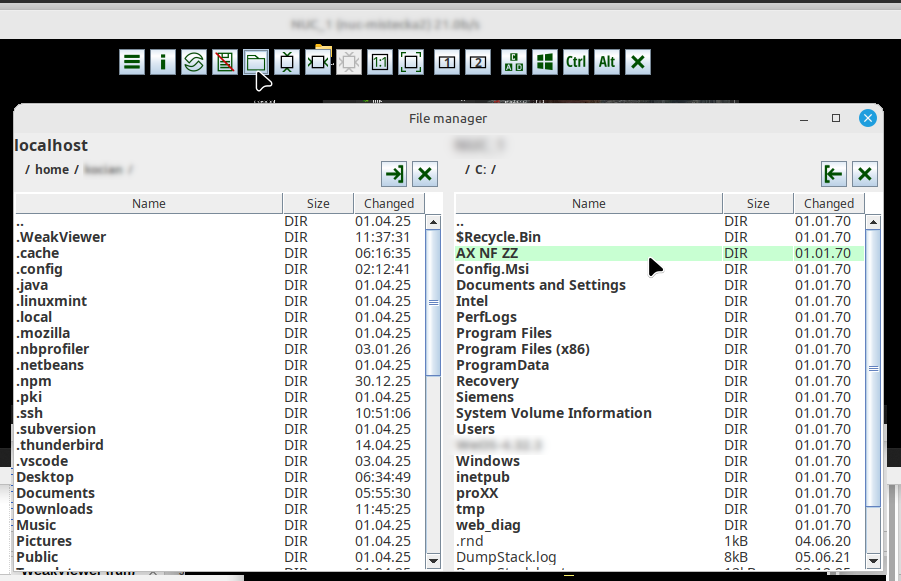
File transfers. Files can be copied from/to server. It is possible to transfer several files at once. This feature needs to be supported by server.
UTF-8 encoding support for bidirectional clipboard. This feature needs to be supported by server.
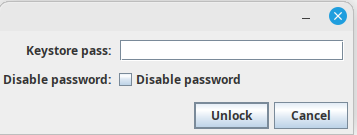
Optional encryption. All sensitive saved data may be encrypted. User is strongly encouraged to set the WeakViewer keystore password, which serves as a private key to encrypt all saved TightVNC passwords. Once the keystore password is set, an unlock dialog will appear always before the WeakViewer starts. You should never let the WeakViewer to save it’s data unencrypted.
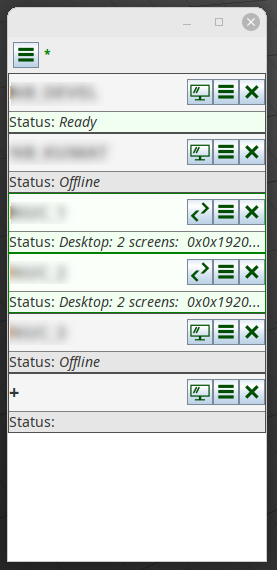
Servers list is in fact the program main window. Configured TightVNC server stations are listed there. The list provides convenient way to check the servers availability (based on TightVNC server port availability), start/stop connection, modify the connections parameters and view the connections status messages. Connection specific log file can be shown by mouse click on any connection status line.
A hidable top tool panel holds several handy tools. It is possible for example to enable/disable clipboard, fit image in several different ways, send special key events to the server or launch a file manager from there.
File manager allows you to transfer files between server and client conveniently.